Home » Archive

Articles in the Blogging Category

Blogging, Random Posts, Web Servers / Hosting »

[19 Feb 2012 | One Comment | ]

You might have noticed a couple of days ago that this blog, and my other WordPress blogs, was down. First time, when you visit the blog, you’d probably seen the "Account is suspended" error. Second was a database error and then the last, before everything went back up, was an internal server error.

If you don’t know this yet, my WordPress blogs are hosted in a server owned by a very generous and kind person. He is hosting other bloggers’ sites on this server, including his very own blogs as well. Though I can manage fixing errors or problems myself, he’s been very helpful whenever I have questions or concerns. The thing is, though I have my own cPanel access, there are issues I can’t resolve on my own because it’s all in his control. And I can’t thank him enough for his patience.

Before I found out there were problems on our server, I was actually busy writing a blog post on our food blog about this brand that carries one of the high quality foam mattress I’ve ever used. I was all up into writing it that I didn’t even check our blog first, which is usually a daily habit of mine. I only found out the sites were down when one of my giveaway participants posted on my Facebook page for Pinay Reviewer telling me the blog is giving her the "Account is suspended" error. :o

Anyway, what this post is about is my thoughts about moving to a server of my own. The only reason behind this is I feel a li’l shy about asking my generous host for help whenever there’s an issue. He’s very nice and I know he’s more than willing to help, but he’s uber busy as well.

The only thing that’s holding me back now is the convenience and, of course, I don’t pay for hosting. I know a ton of people will say go for free hosting. The server’s been reliable and I never had any issue actually. Like maybe once a year or once every 6 months, which is almost perfection.

What do you think? Should I make the move or what?

Blogging, Blogging Tools, Product Launch, Announcements, News, Recommended Tools and Applications, Tips & Guides »

[4 Jan 2012 | 2 Comments | ]

I was checking and updating my WordPress blogs earlier when I saw this message that ShoutMix free chat box is “currently” unavailable.

ShoutMix free plan is currently unavailable

I clicked on the link and I was directed to this page where Snecx Tan, the owner and creator of the chat box service ShoutMix, shared, through an open letter, that they can no longer continue the free service because it is no longer sustainable.

They said they’ve tried everything and wouldn’t want to impose popup ads like their competitors (they could only mean CBox, right? :D ). This was actually the main reason why I switched from cBox to ShoutMix – no annoying popup ads.

Most of the bloggers I know have a chat box on their sidebars where they get to quickly respond to their blogs’ visitors. I find it a convenient way for those who are not familiar with the commenting system to send me messages (though I would prefer they use the contact page since there’s a form they can use and my email address is also posted there).

Now, upon searching for an alternative for ShoutMix, the closest I got was cBox. I’m not willing to shell out $0.99 per month for a chat box I don’t really use as often as my email. But, if you’re one of those who use it a lot, then I recommend you upgrade.


Alternative Chat Box Plugin for WordPress Users

For WordPress users like me, there’s actually a cool plugin you can setup on your sidebar and it’ll be your very own chatbox. It uses your commenting system, but it will be setup as a sidebar widget. It’s WP Wall.

I used it on a client’s site. I liked the fact that I can completely change how it looks. I implemented it as a message wall and it’s now displayed on the main contents part of one of the pages on their site instead of the sidebar. Here’s how it looks like:

WP Wall implemented on the main contents section of a page

Oh, how I love WordPress! :)

You can fully customize CSS file wp-wall.css to your liking. Plus, it’s updated real-time, meaning you don’t have to refresh the page to see the new messages. You can see IP address of the poster, the time they posted the comment on your dashboard so you can easily moderate them too. Cool, eh? :) These options were for premium or pro plans on ShoutMix so it’s great that they’re available for free from WP Wall.

I’ll be setting this up on my other blogs (Update: I just implemented this at the footer section of this blog). I wish I can find something like this on my Blogger blog.

Found any alternative for ShoutMix you’d like to share with me? Feel free to leave the links in the comments section. :)

ShoutMix should remove the misleading message that the free plan is “currently unavailable” since they’re no longer offering it for free. It should read “free plan is no longer offered”.

Blogging, Gadgets & Toys, Mobile / Smart Phones »

[2 Jan 2012 | No Comment | ]

I’m trying out blogging on this WordPress app on my Blackberry. I’m doing this for a full review I’m composing about my Blackberry Bold 9900 phone. All I can say for now is I’m loving it.

Any other Blackberry users out there? Feel free to share how much you love this smartphone and why. :)

Blogging, Computer Software, Recommended Tools and Applications, Tips & Guides, Troubleshooting »

[30 Dec 2011 | One Comment | ]

I have already blogged about why you should switch to Windows Live Writer for your offline and even online blogging editing needs. I also posted a guide on how to setup Windows Live Writer. Now, let me share with you a couple of the errors you might encounter while using this awesome blog post editor.

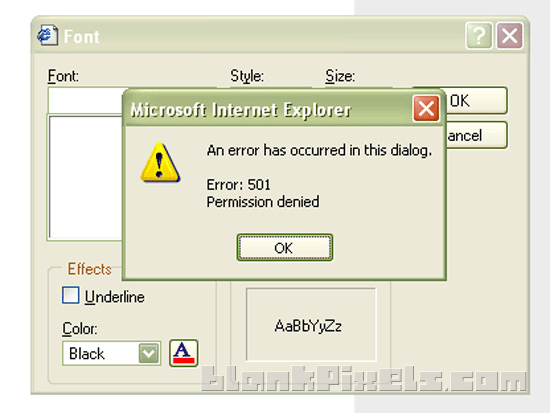
I have been using WLW for over a year now and I’ve encountered a couple of errors that I managed to fix myself and with a little help of Google. One of the worst problems I experienced was getting this Error 501 whenever I edit the font style.

Error 501 on Windows Live Writer when changing the font style

This error came as a surprise since I didn’t change anything with my internet options. I can’t really remember if I installed something that should mess with the settings, but for some reason, I started getting this error.

(more…)

Blog Design, Blog Design Portfolio, Blog Makeovers, Blogger Themes Design, Blogging, Design, Portfolio, Wordpress Blog Design / Makeovers, Wordpress Themes Design »

[21 Dec 2011 | One Comment | ]

When my bro Ken decided to change his domain from What The Fat (here’s the theme I designed for him then) to something that he can use for a lifestyle blog, it took us weeks to come up with something we’re sure he’d stick with for a long time. And one afternoon, while we were on our way to somewhere (I can’t remember where we were going), we thought of Ken Avenue. Immediately, ideas for his blog’s design came rushing in.

I had big plans for the design, but Ken won’t stop searching for the theme he’d want to use or something I can get ideas from. That’s why I don’t have a screenshot of his old theme because before we finally settled in his current blog’s design, he switched to about probably 20+ themes. :D

So, here’s the final layout:

Ken Avenue theme design

He wanted a plain white background, a narrow main content area with 2 sidebars on its sides, and a mix of black, white and gray hues.

(more…)